A Garden Laboratory that Fits in your Pocket Buy Now
Digital Soil Moisture Meter with Light and Temperature Measurement
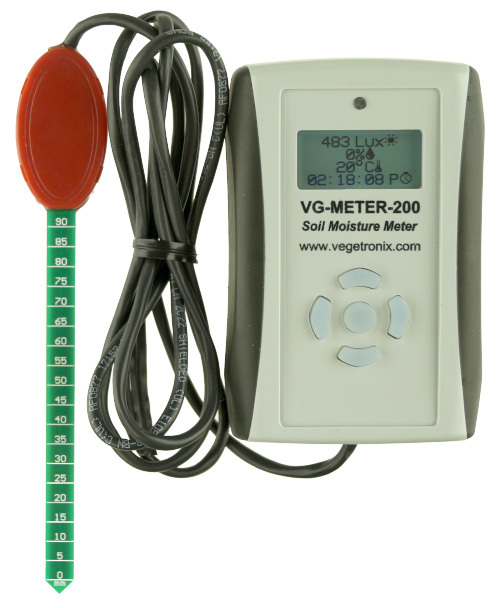
Light Sensor

Graphical Backlit Display

Ergonomic Rubber Side Grips
Backlit Rubber Keypad
Ambient Temperature Sensor

120cm (4 Ft) Cable

Integrated VH400 Moisture Sensor

How to Water Your House Plants Like a Scientist
Digital Soil Moisture Meter Features
- Graphical digital display, with LED back light.
- Includes integrated VH400 soil moisture sensor.
- Displays moisture, ambient air temperature, and light levels, and displays time.
- Pocket sized rugged case.
- Low cost.
- Easy to use.
- Not conductivity based, and insensitive to salinity.
- Probe does not corrode over time.
- Rugged design for long term use.
- Long battery life.
- Precise measurement.
- Measures volumetric water content (VWC).
- The probe can be buried and is water proof.
- Because the probe is slender, it can also be used in smaller house plants without disrupting roots.
- USB version works with: Windows, Linux, and Apple OS.
Digital Soil Moisture Meter Applications
- Crop Steering.
- Perfect gift for gardeners in your life.
- Health and moisture checks of potted plants.
- Compost management.
- Irrigation and sprinkler systems.
- Moisture monitoring of bulk foods.
- Rain and weather monitoring.
- Environmental monitoring.
- Water conservation applications.
- Fluid level measurements.
Professional Digital Moisture Meter Details
This break through soil moisture meter is for professionals, but is affordable to any hobby gardener.
Moisture, temperature,and light are the three most critical parameters for your plants. The VG-METER-200 measures all 3 of these, and comes in a rugged pocket sized case.
Integrated VH400 Moisture Probe
This meter comes with our highly accurate VH400 soil moisture sensors with a 1.2 meter (4 ft) cable. The VH400 probe is slender so it will not disrupt the root system of your plants. It's also rugged, waterproof and will never corrode. Because it uses transmission line techniques to measure moisture, the VH400 probe is insensitive to soil salinity. Soil moisture results are displayed as a simple percentage (VWC) and ranges from 0 to 100%.
Measures Ambient Temperature
The meter can display ambient temperature either in Celsius or Fahrenheit. The temperature is measured at the hand held unit.
Are your Plants Getting Enough Light?
Without a light meter, it can be difficult to know if your indoor plants are getting enough light, or if outside shade plants are getting too much light. The VG-METER-200 helps you to figure this out by displaying light levels in Lux, allowing you to either move your plants, or increase the light levels with grow lights.
Rugged Ergonomic design
The hand held enclosure is small enough to fit in a pocket, and has molded rubber sides for a comfortable grip.
The meter can easily be customized using the simple 5 key silicone rubber keypad. For example, using the keypad, you can set the time, and temperature units by selecting options from the menu screen.
Highly Visible Graphical Display
The meter comes with a easy to read graphical display. The home screen displays all 3 measurements with the current time and icons indicating each measurement. For greater visibility, each of the measurements can be viewed exclusively in large format characters, by pressing the left and right keys on the keypad.
Long Battery Life
It runs on 2 AA batteries and because it is so low power, the batteries should last for years, with normal use.
Stream Data to a Computer with the USB Version
The meter comes in two varieties, one with a USB interface and one without. The version with the USB interface, can stream data to a computer through most communication programs such as Termite, Putty. The USB version comes with a micro-USB cable.
Perfect Gift for Loved Ones
The meter makes the perfect gift for any avid gardener for birthdays, anniversaries, and holidays. Because it is not your common gift, your love one will be surprised and feel appreciated and understood.
We Want You to be Happy
Ordering is easy and low risk. Since we build our own products at our factory, all of our products are in stock. When you place your order from our website, it will ship same day from our factory, and you'll have it in your hands in just a couple of days. We ship to nearly EVERY COUNTRY in the world.
If you aren't amazed and delighted by your new VG-METER-200, return it for a refund within 30 days.
What Our Customers Are Saying:
"As the owner of a disabled veteran-owned company, I'm currently engaged in an exciting project focused on crop steering for cannabis grown in soil. Your VegeHub's have caught my attention as they seem to be the perfect fit for our experimental needs.
I'm already a satisfied owner of a VG-Meter-200, and I can't speak highly enough about its accuracy and non-corrosive properties. The quality of your USA-made products is truly impressive, and I'm eager to incorporate more of your technology into our research.
Your commitment to producing high-quality, reliable equipment is exactly what we're looking for in this innovative field. I'm enthusiastic about the potential of using your systems to advance our understanding of soil-based cannabis cultivation.
Thank you for your time and for creating such exceptional products that support American agriculture and innovation."
Jeremy in South Hamilton, MA.
"This thing is epic for tuning irrigation cycles. You can literally watch the plants absorb water during a watering event after a forced dry spell. Awesome!
It is fascinating to watch the gentle 0.6 GPH emitters slowly saturate the media from a very low VMC%, raising it quickly, then literally seconds later, watching it drop as the thirsty plants "gorge themselves at the trough", stabilizing and even dropping the VMC% for up to 30 seconds. Truly amazing to watch.
Plants are creatures more amazing than ourselves in many cases. Every year I farm reveals something amazing about them that leaves me gasping in awe of their level of energy processing and speed of reactivity.
As a classically trained engineer it makes me solemnly aware how there are forces that science cannot yet explain, putting them squarely in the category of Magic. Wonderfully humbling :)"
Zach in Buckfield, Maine
"Thank you to Vegetronix for saving my houseplants! Even if you have only a few plants, you should invest in the Vegetronix meter.
It is accurate, fast, and easy to use. It works in an entirely different way than the cheap $10 meters from a hardware or big box store. I just simply insert the probe in my soil and I know whether or not to water my plant.
Since plants are expensive, and of course no one wants to kill a plant by over or underwatering, the Vegetronix meter pays for itself in a very short time. Even better, the customer service is excellent! "
Louise in Wheaton, Illinois
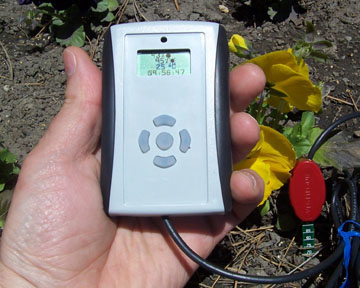
VG-METER-200 Moisture Meter
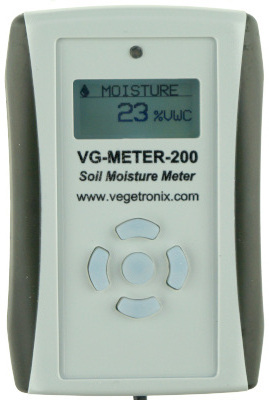
Large Format - Moisture View (VWC)
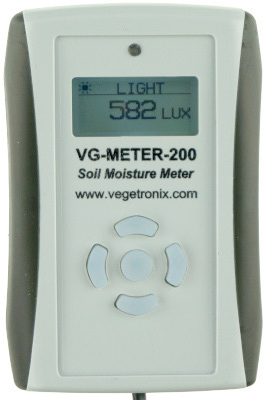
Large Format - Light View (Lux)
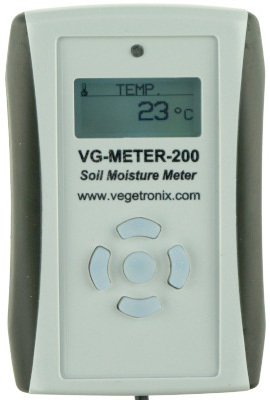
Large Format - Temperature View (°C or °F)
Soil Moisture Meter Pricing and Ordering Info
We ship to nearly EVERY COUNTRY on the planet, directly to you from our factory.
99% of orders ship same day.
| ORDER INFO | |||
| Part Number | Description | Price | Purchase |
| VG-METER-200-BASIC | Professional digital soil moisture meter (no USB) with integrated VH400 sensor. | Buy Now | |
| VG-METER-200-USB | Professional digital soil moisture meter with USB with integrated VH400 sensor. | Buy Now | |
Contact us for volume pricing information.
Other Vegetronix Products of Interest
- VH400 Soil Moisture Sensors
- VegeHub Garden Sensor WiFi Hub
- Water Level Sensors
- Soil Moisture Sensor Relay Boards
- Soil Temperature Sensors
- Voltage to Current Loop Translators
- SDI-12 Protocol Translators
- Data Loggers
Digital Soil Moisture Meter Videos
Five Reasons Why Your Chinese Moisture Meter Sucks
I often get this question, "Tim - Can't I just use my $10 Chinese moisture meter that I got off amazon?". Here's my response...
Soil Moisture Tutorial
The Techno Gardener gives a basic tutorial on soil moisture,explaining capillary action, gravitational water, water holding capacity, field capacity, plant available water, and wilting point for plants.
Soil Moisture Meter Specifications
| VG-METER-200 | |
| Batteries | 2 AA |
| Dimensions | Enclosure: 2.5cm x 6.4cm x 94 cm (1in x 2.5in x 3.7in) |
| Operational Temperature | -20ºC to 85ºC |
| Baud Rate | 9600, 8 bits, No Parity, 1 stop bits |
| Sample output rate (USB version) | 1 sample/second |
| Cable Length | 1.2 meters (4 ft) |
| Operating Systems: | Windows, Linux, and Apple OS |
Soil Moisture Meter Operating Manual
To turn the unit on, press the center button.
To scroll up and down through the menu, use the up and down buttons.
To return to the previous menu without saving data, use the left button.
To return to the previous menu and save data, use the center button.
To modify data on a a data input screen use the up and down keys.
The meter has the following menu items available:
- DISPLAY
- ON TIME Set the number of minutes for the display to stay on before sleeping. Set to zero for always on.
- BACKLIGHT Turns on or off the display back light.
- BATTERY Displays the current battery voltage.
- ORDER Adjust the display order of values. Select the value which you wish to move up or down by pressing the center key, and then use the up and down keys to move it up or down in the list.
- MOISTURE
- SHOW Show or disable the moisture level on the main screen.
- VWC/VOLTS Express the soil moisture reading in VWC (Volumetric Water Content) or in sensor Volts.
- LIGHT
- SHOW Show or disable the light level on the main screen.
- TEMP
- SHOW Show or disable the temperature on the main screen.
- UNITS Express the temperature in Celsius or Fahrenheit.
- TIME
- SHOW Show or disable the current time on the main screen.
- SET TIME Set the current time.
- MILITARY Toggle between standard time(am/pm) and military time format.
USB Commands for USB enabled Soil Moisture Meter
A serial communications program must be used to access the meter. While the meter will work with most any serial communications program, we recommend our Online Serial Terminal for Chrome Or Edge Web Browsers.
When you plug a USB Comm device into your computer it will randomly assign a comm port number. To determine which comm port the device has been assigned to do the following:
- Open Windows device manager. This can be access through the control panel.
- Plug in the USB device. You should see the device under the tree node labeled: "Ports (COM & LPT)"
- When you un-plug the USB device, that device should disappear. You now know the correct comm number.
- Open the Termite Program.
- Push the "Setting" button on the too bar.
- Select the comm port that you determined from the steps above.
- Set the Baud Rate to 9600.
- Data bits should be 8.
- Stop bits should be 1.
- Parity should be none.
- Flow Control should be none.
- Under the "Transmitted Text" group box, select "Append CR".
- Select Okay to close the Settings box.
- The meter should now stream data to the terminal window.
When properly connected data will be displayed in the following format:
Moisture, VWC, light, %, time
0,VWC,3,%, 27,C,12:18:03 P 0,VWC,3,%, 27,C,12:18:03 P 0,VWC,3,%, 26,C,12:18:04 P 0,VWC,3,%, 27,C,12:18:04 P Make sure that the meter is turned on, by pressing the center button, otherwise the data will not stream. For a volts reading via USB, use the keypad to put the unit in volts mode, as describe above.Frequently Asked Questions (FAQ)
1. Do I have to insert the blade of the probe all the way into the soil?
You may have shallow pots where the blade will only partially be inserted. The meters are calibrated assuming that the blade is fully inserted, however, you can still take a reading even if the probe is only partially inserted into the soil. The soil moisture sensor takes an average reading over the length of the blade. As a rule of thumb, if you insert the blade only half way, then you will get approximately half the reading you would normally get, if you inserted it fully.
2. The meter is not measuring the soil temperature, what's wrong?
The meter measures the ambient air temperature, not soil temperature. There is no temperature sensor in the probe. The temperature sensor is in the hand held display.
3. What are the ideal moisture ranges for my plants?
The right moisture level depends on your soil type and the type of plant you have. The table below will give you approximate values by soil type. You'll notice from the table that water binds most tightly to clay, and on the other extreme that water tends to pour through sand. Because clay binds water so tightly it may also be difficult for the plant to extract the water from clay, as compared to other soil types, such as potting soil with lots of organic matter. For a more complete overview see the Soil Moisture Tutorial video above.
As you gain experience with the meter, you will intuitively be able to figure out what is best for your application.
| Approximate VWC Levels for different Soil Types | |||
|---|---|---|---|
| Condition | Potting Soil | Clay | Sand |
| Saturated | >50% | >60% | >15% |
| Moist | 30-50% | 40-60% | 7-15% |
| Needs Water | 20-30% | 30-40% | 2-7% |
| Critically Dry | 0-20% | 0-30% | 0-2% |
Trouble Shooting
If the meter isn't going to sleep. You need to go into the menu, and allow sleeping, as follows:
Press the center button, to get to the menu. Select "SETTINGS". Select "SLEEP BLOCK". Select "ALLOW".
Now Under "SETTINGS". Select "SLEEP DELAY". Select "30 sec".
The meter should turn off after 30 seconds.
How to Get Started with Digital Soil Moisture Meters
Vegetronix sells and ships these meters direct world wide. Use the red button above to make a purchase.
Buy Now